
Introduction: Innovation drives our world forward. Every year, tech brands release faster phones, lighter laptops, and smarter appliances. As we upgrade, though, we also create a growing pile of old electronics that still hold useful materials, reusable parts, and real environmental risk if they are handled badly. The good news is simple: with better habits and the right recycler, yesterday’s devices can still deliver value.
- Discarded tech still contains recoverable materials and reusable components.
- Phones, laptops, cables, printers, routers, and appliances can all belong in the same waste stream.
- Safe handling protects both the environment and your personal or business data.
- Good sorting starts at home or at work, before a device leaves your hands.
- Convenient local collection makes responsible disposal far more likely.
- South Africans can turn clutter into a cleaner, more useful resource stream.
Why do retired devices still matter?
Retired devices still matter because they contain reusable materials and, in many cases, components that can be repaired, harvested, or safely separated. Treating them like ordinary rubbish wastes value and increases environmental harm.
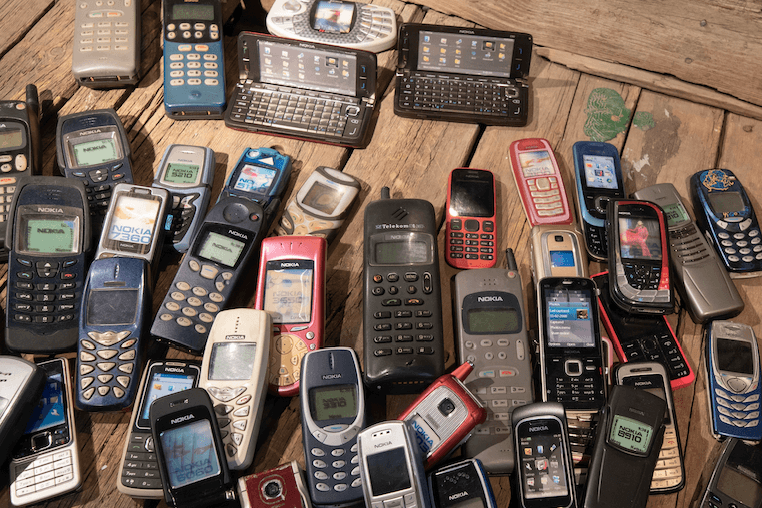
That point is easy to miss because electronics often leave our lives quietly. A cracked tablet goes into a drawer. An office server gets replaced and pushed into storage. A broken kettle sits in the garage for months. Soon, the pile grows.
If you want to stop that cycle early, arranging proper e-waste handling before clutter builds up is a smart first move. It helps households clear space, and it helps businesses avoid turning storerooms into risk zones.
The scale of the issue is global. According to the International Telecommunication Union, the world generated 62 million tonnes of discarded electronics in 2022, and only a limited share was formally collected and recycled. That gap is exactly where hidden value gets lost.
The older article on this topic had the right instinct: modern upgrades leave behind a trail of devices. That is still true. What has become even clearer is that this stream is not just a cleanup problem. It is a materials problem, a data problem, and a systems problem all at once.
What counts as discarded electronics?
Most unwanted items with a plug, circuit board, charger, or battery belong in this stream. If it uses electricity or stores power, it usually needs special handling rather than a normal bin.
This includes small personal gadgets, office equipment, large household appliances, accessories, and batteries. In everyday life, people often focus on phones and laptops first, but the category is much wider than that.
- Mobile phones, tablets, laptops, and desktops
- Printers, screens, keyboards, and routers
- Cables, chargers, adaptors, and power banks
- TVs, speakers, game consoles, and entertainment devices
- Kitchen and household appliances
- Tools and equipment with rechargeable batteries
Which items should you sort first?
Start with devices that store data, contain batteries, or take up the most space. These items create the biggest mix of security, safety, and clutter issues.
That usually means phones, laptops, tablets, desktop towers, servers, power banks, and damaged battery-powered items. Once those are separated, the rest of the load becomes easier to manage.
Common electronics that should be separated before disposal
| Category | Typical items | Why sort them early? |
|---|---|---|
| Data-bearing devices | Phones, laptops, tablets, desktops, servers | They may hold personal files, logins, or company records. |
| Battery-powered items | Power banks, cordless tools, wireless accessories, old phones | Aging batteries can swell, leak, or become unsafe in storage. |
| Office electronics | Printers, monitors, routers, network gear | They pile up quickly during upgrades and often need bulk handling. |
| Home appliances | Microwaves, kettles, toasters, vacuum cleaners | They are bulky and often end up sitting unused for long periods. |
| Accessories | Cables, chargers, adaptors, remotes | They are small, easy to ignore, and simple to gather in batches. |
Why is binning electronics risky?
Putting electronics into ordinary waste is risky because valuable materials are lost and hazardous substances can enter the wrong environment. The damage is often slow, hidden, and expensive to reverse.
Many people think the main problem is clutter. In reality, the bigger issue is what happens after disposal. Devices can contain metals, plastics, glass, and substances that need controlled processing. When they sit in landfill or are broken apart informally, the result can be pollution and unsafe exposure.
According to the World Health Organization, discarded electronics may contain toxic substances such as lead and mercury, and unsafe informal handling can harm workers and nearby communities. That matters in every country, including South Africa, where storage, transport, and disposal habits vary widely.
There is also a common household problem: people keep old electronic devices far longer than they intend to. A drawer full of unused phones may feel harmless, but aging batteries and forgotten data both create avoidable risk.
How does responsible handling work?
e-waste management covers the whole chain: collection, secure handling, sorting, dismantling, and material recovery. Good systems also identify batteries and data-bearing devices before further processing starts.
In practical terms, responsible handling is less mysterious than it sounds. First, devices are gathered and separated by type. Then reusable units may be tested, while damaged or obsolete items move into dismantling and material separation. Batteries, cables, plastics, circuit boards, and metal fractions do not all follow the same path.
A weak process mixes everything together and hopes for the best. A strong process keeps clear records, limits unnecessary handling, and makes sure sensitive items do not drift into informal channels.
For businesses, this is especially important during office moves, hardware refreshes, branch closures, and server replacements. For households, the same principle applies on a smaller scale: do not wait until a cupboard is overflowing before you act.
What should you do before collection or drop-off?
Before any handover, protect your data, remove what you still need, and separate obviously damaged batteries if you can do so safely. A few simple steps reduce stress and make the recycling process smoother.
3 quick steps
Back up important files, photos, and contacts.
Sign out of accounts and disable device locks where needed.
Remove SIM cards, memory cards, and accessories you want to keep.
Label company assets so internal records stay clear.
Store damaged devices somewhere dry and out of direct heat until handover.
If you are unsure about wiping a computer or phone, South Group shares a useful step-by-step guide to safe device disposal that covers backups, data removal, donation, and recycling choices.
Data security deserves special attention. Businesses clearing laptops, phones, or servers should review South Group’s practical advice on secure data destruction before any equipment leaves the premises.
This matters even when a device still seems marketable. If you are comparing repairs, donations, trade-ins, or browsing searches like e-waste phones for sale, wipe the device first and confirm its condition before anyone else handles it.
Why is recycling a practical win?
Responsible recycling is a practical win because it turns clutter into a resource stream and keeps risky components out of the wrong places. It also supports a more circular use of materials already in circulation.
One clear benefit of e-waste recycling is that it helps recover useful material from products that would otherwise be dumped, stored, or informally stripped. That makes sense for homes, schools, shops, offices, warehouses, and industrial sites alike.
Another benefit is cleaner decision-making. Once people understand that a drawer of retired gadgets is not harmless junk, they stop delaying action. They sort faster, plan better, and create less mess during upgrades.
Many people shorten the term to ewaste recycling, but the goal is the same: keep materials in use for longer and handle harmful parts with care. The phrase may sound technical, yet the basic idea is simple. Do not waste what can be recovered, and do not dump what needs specialist treatment.
For businesses, there is an operational upside too. Good disposal habits reduce storage pressure, lower the chance of data mistakes, and make asset replacement cycles easier to manage. For households, the reward is simpler: less clutter, less guesswork, and a cleaner home.
Where should South Africans start?
South Africans should start with a recycler that can accept their device type, explain the handover process, and advise on data-bearing items. Convenience matters because people are far more likely to act when drop-off or collection is clear and close by.
That is why local access is so important. If you are dealing with a single box of cables or a full office clean-out, you need a practical route, not just good intentions. South Group offers support from four locations across South Africa, which helps households and businesses move from storage to action.
If you are searching for broken gadget recycling South Africa, ask a few simple questions first: Does the recycler handle data-bearing devices? Can they advise on damaged batteries? Do they accept mixed loads from home or business environments? A clear yes to those questions saves time later.
For households, the best starting point is usually a first sorting session at home. Separate phones, laptops, cables, chargers, and small appliances into groups. For businesses, start with an asset list and identify devices that store data, especially desktops, laptops, tablets, phones, servers, and networking equipment.
When you are ready for local electronic waste recycling, working with a specialist recycler makes the next steps easier to plan and easier to trust.
How can homes and businesses build better habits?
Better habits come from making electronics disposal routine instead of occasional. The goal is to create a simple system that works every time a device reaches end of use.
At home, that can be as basic as keeping one clearly marked box for dead cables, chargers, and small gadgets. Once it fills up, book a drop-off or collection. At work, the same idea can scale into quarterly clean-outs, IT asset reviews, and written handover rules.
- Buy a little slower and replace only when needed.
- Repair usable items before retiring them.
- Do not store damaged batteries in hot cars or direct sunlight.
- Keep work devices and personal devices separate during clean-outs.
- Schedule electronics clear-outs after upgrades, relocations, or audits.
- Teach staff and family members what belongs in the stream and what does not.
These habits sound small, but they change outcomes. A household that sorts regularly is less likely to dump gadgets with general waste. A company that tracks retired hardware is less likely to lose equipment, forget drives, or delay disposal for months.
That is the hidden value story in real life. It is not only about materials inside a device. It is also about better systems, cleaner spaces, lower risk, and more responsible choices.
Summary
Discarded electronics are not just clutter. They are a growing stream of materials, parts, batteries, and data-bearing devices that need proper handling.
When people bin, burn, or ignore retired tech, they lose recoverable value and increase environmental and safety risks. When they sort devices early, protect their data, and work with a specialist recycler, the process becomes far more useful and far less stressful.
For South African households and businesses, the practical path is clear: gather retired devices, separate data-bearing equipment, handle batteries carefully, and use a reliable local recycler when the load is ready to move.
FAQ
Can I recycle chargers, cables, and small accessories?
Yes. Chargers, cables, adaptors, earphones, remotes, and similar accessories should be kept with your retired electronics rather than thrown into ordinary waste. They are easy to collect in one container and hand over in batches.
Should I remove batteries before handing over a device?
If a battery is removable and you can take it out safely, that can help with sorting. If the battery is built in, swollen, leaking, or damaged, do not force it out. Store the device carefully and ask the recycler for guidance.
What if my phone or laptop still works?
A working device may still be suitable for repair, reuse, or donation. Before you pass it on, back up your files, sign out of accounts, and wipe the device so your information does not travel with it.
How should a business clear out old IT equipment?
Start with an asset list, identify all data-bearing devices, and assign one person to manage the handover. That keeps records clear and reduces the chance of drives, phones, or laptops leaving the site without proper checks.
Is it okay to keep broken phones in a drawer for years?
No. Long-term storage often leads to forgotten batteries, forgotten data, and more clutter. It is better to sort them early, store them in a cool dry place for a short time, and arrange a proper handover when you have enough items ready.