
Introduction:This article covers the electronic waste risks tied to retired servers and laptops in South African offices, and why deletion or a quick format does not make them safe. It explains how POPIA duties continue to apply once equipment is taken out of daily use, which informal disposal routes raise the most exposure (storerooms, classifieds, scrap collectors, untracked donations), and what a secure electronic waste disposal process actually looks like — from asset listing and controlled pickup through data wiping or physical destruction to final recycling. It also walks through a practical 50-laptop finance refresh example, the records IT managers should request from a recycler, how to compare electronic recycling companies, and the right time to act before old hardware piles up in Cape Town, Johannesburg, Durban, or Pretoria.
Key Takeaways
- Old servers and laptops often keep data long after staff think they are empty.
- Deleting files or doing a quick format does not make devices safe.
- POPIA duties still apply when equipment is retired or sent off site.
- Storerooms, classifieds, and informal scrap collections all raise data leakage risk.
- A secure disposal process needs chain of custody, data destruction, and reporting.
- Ask for certificates, asset lists, and material recovery records from your recycler.
- The safest route is to arrange collection before old hardware starts piling up.
Why are old servers and laptops a bigger data risk than other office equipment?
Because they store far more than the visible files on a desktop. Even a retired device can still hold personal information, login tokens, mail archives, cached reports, and old backups.
Printers and phones can create risk too, but servers and laptops are the devices where business data tends to collect over time. A finance server may hold years of exports. A sales laptop may still have customer lists saved locally. An HR machine may carry scans of IDs, payroll files, and email attachments long after the user has moved on.
That is why retired IT kit needs to be treated as a data asset first and scrap second. When it sits in a storeroom for months, changes hands without records, or leaves site through an informal buyer, the problem is not only clutter. It is unauthorised access waiting for an opportunity.
What data usually stays on retired IT hardware?
More data stays behind than most teams expect. Old devices often keep business information in hidden, cached, or forgotten locations.
Electronic waste examples in an office setting include end-of-life laptops, rack servers, SSDs, HDDs, backup drives, docking stations, and retired networking gear. On those devices, the real concern is what still sits on storage media: saved browser sessions, synced cloud folders, user profiles, contracts, payroll files, customer records, scanned documents, and sometimes access keys for line-of-business systems.
Even when a device no longer boots properly, its drive may still be readable. That is why a dead laptop is not a safe laptop. The practical step is simple: keep failed units inside a documented disposal stream and make sure the storage media is either securely wiped for reuse or physically destroyed.
Why is deleting files or formatting a drive not enough?
Because deletion usually removes easy access, not the underlying data itself. A quick format can also leave recoverable information behind.
This is where many internal disposal efforts fall short. A user deletes folders, the team runs a reset, and everyone assumes the machine is clean. However, old partitions, shadow copies, cached mail stores, and recoverable file fragments can remain. Failed drives create another issue – you cannot wipe what you cannot reliably access.
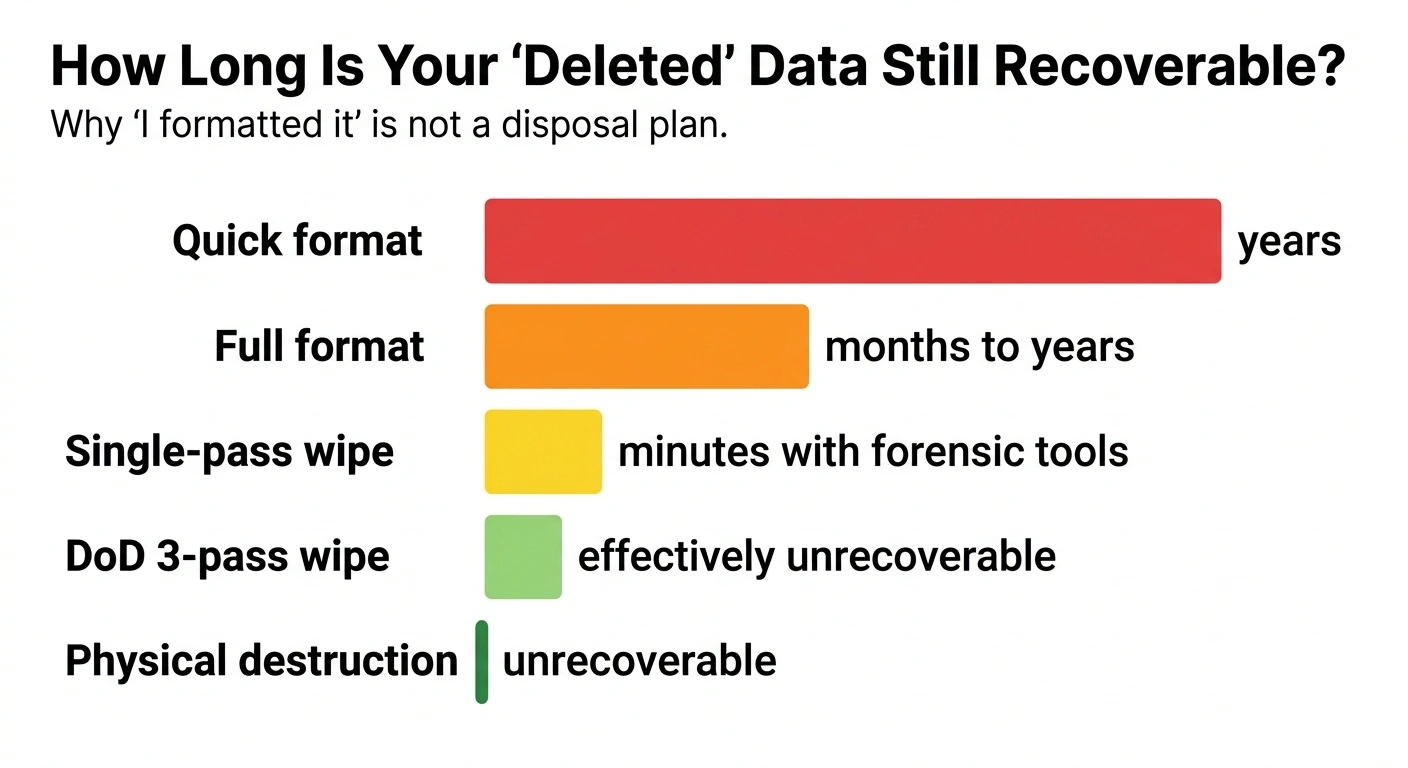
If your team needs a simple refresher on secure disposal steps, South Group also shares guidance on how to properly dispose of old electronic devices. The key point is that the data step must be verified, not assumed.
For IT managers, that means choosing a process that matches the asset. Reusable equipment may be data wiped with reporting. Scrap-only equipment should go to physical destruction and controlled downstream recycling. This is where a compliance-focused recycler like South Group steps in.
What goes wrong when old hardware is stored, resold, or scrapped informally?
It usually leaves a gap between “we stopped using it” and “the data was actually destroyed.” That gap is where unauthorised access and compliance exposure start.
Across South African offices, the same patterns come up again and again. Old laptops go into a back room after a refresh. A branch closes and servers get left in a locked cabinet. Someone suggests selling retired devices on a classifieds site. A local scrap collector offers to take the metal away quickly. Each option may feel practical in the moment, but none of them solve the data question unless the drives are handled properly and documented.
The simple way to fix this is to move devices out of ad hoc disposal and into a formal, controlled process. Once collection, custody, sanitisation, and reporting are in place, the risk drops sharply.
Which disposal routes create the highest data leakage risk?
The riskiest routes are the ones with the least control and the least proof. If no one can show who collected the device, how it was sanitised, and where it ended up, your business is exposed.
Table: This table shows common disposal routes for retired servers and laptops, the likely data outcome, and the simplest fix.
| Disposal route | What usually happens to the data? | Main business risk | Simple fix |
|---|---|---|---|
| Stored in a storeroom | Data remains on drives for months or years | Internal misuse, loss, or theft with no record trail | Log assets and schedule collection before storage builds up |
| Sold on classifieds or passed to staff | Devices leave the business before verified sanitisation | Unauthorised access, reputational damage, and disputes | Wipe or destroy media first and keep disposal records |
| Handed to an informal scrap collector | Hardware is broken down for parts or value with no data controls | No chain of custody and no proof of destruction | Use a recycler that issues collection and destruction records |
| Donated without a secure process | Old user data may still be present on storage media | Exposure of customer, staff, or financial information | Sanitise first, then document transfer and recipient details |
| Handled by a formal recycler | Data is wiped or destroyed under a controlled process | Lower risk, audit trail, and easier compliance response | Request certificates, item lists, and final reporting |
Notice that the issue is not only where the hardware goes. It is whether your team can prove what happened to the data. If you cannot show that, you may still carry the risk even after the equipment leaves your office. This is where a compliance-focused recycler like South Group steps in.
How does POPIA apply when you retire servers and laptops?
POPIA still applies during disposal. If personal information remains on a retired device, your duty to protect it does not end just because the asset is old.
Under the Protection of Personal Information Act 4 of 2013, organisations must secure the integrity and confidentiality of personal information by taking appropriate, reasonable technical and organisational measures. That duty matters just as much at retirement stage as it does in day-to-day operations.
For IT and facilities teams, this is the point that often gets missed. A laptop may be out of service, but if it still carries HR data, customer records, or user credentials, your business remains responsible for how that information is handled. If the device later resurfaces with readable data, you may face regulator attention, internal investigations, civil claims, and reputational damage.
A structured electronic waste management process helps close that gap by controlling collection, transport, data sanitisation, destruction where needed, and reporting. That is the practical route that turns a compliance worry into a managed task.
What counts as compliance exposure during disposal?
Any weak point that leaves data accessible or leaves you without proof can create exposure. In practice, small process gaps often cause the biggest headaches later.
- No asset register showing which devices left the site
- No chain of custody between office pickup and final processing
- No evidence of secure wiping or physical destruction
- Third-party collection with vague paperwork or none at all
- Old hardware sold or donated before the data step is verified
- Drives removed from equipment but not tracked separately
If a security compromise does happen, the FACT SHEET: HANDLING OF SECURITY COMPROMISES shows why handling, assessment, and notification matter. The better answer is to stop the problem earlier with a disposal process that leaves very little room for doubt.
That is also why “we wiped it ourselves” is often not enough for a risk review. You need evidence that the action happened, when it happened, and which assets were covered. This is where a compliance-focused recycler like South Group steps in.
What does secure disposal actually look like?
It looks like control from pickup to final recovery. The hardware is identified, tracked, sanitised or destroyed, and then processed with records your team can keep.
A proper flow is easy to understand. First, the outgoing assets are listed. Then the devices are packed and collected under a documented handover. After that, storage media is either wiped for approved reuse or physically destroyed when reuse is not suitable. Finally, the remaining materials move into formal recycling and your business receives the paperwork.
This matters because a disposal job is only safe when the data step and the audit step both happen. Without both, the risk stays open.
What are the core steps and records in a secure disposal process?
The core steps are straightforward: identify, collect, control, sanitise, verify, and report. Each step should leave a paper trail your IT team can file.
Table: This table shows the key stages in a secure disposal project for servers and laptops and the records your team should expect.
| Stage | What happens? | Why it matters for data risk | What record should you receive? |
|---|---|---|---|
| Asset identification | Devices are counted and listed by type or serial where needed | Prevents missing units and confusion later | Collection list or asset register |
| Controlled pickup | Equipment leaves site under a documented handover | Starts the chain of custody | Collection note or signed handover |
| Data sanitisation decision | Items are sorted for wiping, destruction, or scrap | Matches treatment to actual risk and condition | Processing instruction or job record |
| Wiping or destruction | Storage media is securely cleared or physically destroyed | Neutralises unauthorised access risk | Certificate of destruction or sanitisation report |
| Material recovery | Remaining components go into formal recycling streams | Closes the loop after the data is dealt with | Recycling summary or downstream report |
When should you wipe drives and when should you destroy them?
You wipe when the device is suitable for controlled reuse and the sanitisation can be verified. You destroy when the media is faulty, high risk, or not worth returning to use.
For example, a working batch of office laptops may be candidates for secure wiping if the plan is approved reuse. A dead finance laptop with a failed SSD is a better destruction case because the risk sits in the media and there is little value in trying to preserve the drive. The practical step is to make the decision early and record it clearly.
What documents should you ask for from the recycler?
Ask for enough paperwork to prove the data path, not just the pickup. If the recycler cannot show the chain from collection to destruction or sanitisation, the job is incomplete from a compliance point of view.
At minimum, ask for a collection note, a list of assets or quantities, proof of data destruction or sanitisation, and a recycling report. If your team wants help comparing providers, this guide on choosing an e-waste recycling partner can help frame the right questions. This is where a compliance-focused recycler like South Group steps in.
What does a real project look like for a batch of 50 finance laptops?
It is usually a short, controlled job with clear handovers and clear proof at the end. Once the process is set, it is far less disruptive than leaving the devices to pile up.
Picture a finance team in Johannesburg replacing 50 laptops after a system refresh. The old devices include payroll files, VAT working papers, saved banking templates, and locally stored spreadsheets. The business needs the units gone, but it also needs proof that the information cannot be accessed later.
- The IT team separates the 50 laptops from general office junk and records the batch for collection.
- The recycler collects the devices under a documented handover so the custody trail starts before anything leaves site.
- Each unit is assessed. Working devices may go to secure data wiping if approved for controlled reuse. Failed or risky drives go to physical destruction.
- The business receives evidence of the data outcome, such as destruction certificates or sanitisation reporting for the batch.
- After the data step is complete, the remaining materials move into formal recycling channels for recovery.
- The IT manager keeps the reports with internal disposal records in case compliance, audit, or legal teams ask for proof later.
That is the calm, practical way to dispose of old laptops without creating a second problem after the hardware refresh. Instead of guessing what happened to the drives, you can point to a documented process and close the matter properly. This is where a compliance-focused recycler like South Group steps in.
How do you choose between electronic recycling companies?
Choose the one that can prove control, not the one that simply offers pickup. For servers and laptops, data handling is the main test.
When comparing electronic recycling companies, ask very plain questions. Who collects the devices? What records are issued at pickup? Are storage media wiped, destroyed, or both depending on condition? What proof do you get back? How quickly can they collect from your branch or head office? Can they support recurring clear-outs as refresh cycles happen?
It also helps to keep the priority clear. Yes, computer waste and the environment matters, and formal recycling is the right route for that reason too. However, for retired servers and laptops, the first issue for most IT managers is still the data. If that part is weak, the environmental angle does not solve your immediate business risk.
In practice, the right partner is the one that makes your internal process easier. They help you clear old stock, reduce unauthorised access risk, and give your compliance and audit teams something concrete to file. This is where a compliance-focused recycler like South Group steps in.
When should you act on old servers and laptops?
Act before the storeroom fills up and before anyone suggests an informal shortcut. The best time is during a refresh, office move, lease return, or server migration project.
Waiting usually increases the risk. Labels fall off. Staff forget what is in the pile. Branches change hands. A once-simple batch turns into mixed, untracked equipment with uncertain owners and unknown data sensitivity. That makes disposal slower and makes proof harder to assemble later.
If your business has a pile of retired kit in Cape Town, Johannesburg, Durban, or Pretoria, now is the right time to schedule electronic waste recycling with a data-focused process. That is the simple way to reduce data leakage risk, close off compliance exposure, and clear space without guesswork. This is where a compliance-focused recycler like South Group steps in.
Summary
Old servers and laptops are a risk for one main reason: the data often outlives the hardware. If devices are stored, resold, donated, or scrapped without verified sanitisation or destruction, your business may still face unauthorised access, POPIA pressure, internal investigation, civil claims, and reputational damage. The simple fix is a controlled disposal process with collection records, chain of custody, data wiping or physical destruction, and final recycling reports. If you need a practical partner to help clear retired IT assets in South Africa, South Group Recycling can support a compliance-focused collection. Book a collection or request a quote when you are ready to move old kit out safely.